


Movie Drama & TV Series: Info
0.00.00 Reviews
App Specs
- Version
- 1.7
- Updated On
- License
- Free
- Downloads
- 100,000+
- Developer
- Pro Apps Laboratory
- Categories
- Libraries & Demo
- Platform
- Android
Screenshots

 Analysis by AppCompare
Before I decide what to watch, I often want a quick way to check whether a title is actually the drama or series someone recommended. Movie Drama & TV Series: Info is an entertainment guide for looking up films and TV shows, with details such as cast, audience reactions, teasers, and release information. I find it most useful as a stop between hearing about a title and deciding whether to look for it on a streaming service. It is not a place to play episodes, so I would open it with a question in mind: who is in this show, what is its tone, or does it sound worth investigating?
What to expect from this entertainment guide
The app’s focus is straightforward: help you explore screen entertainment and get a better sense of a title before committing your evening to it. I find that distinction important. A guide can help with discovery and context, but it does not replace the service that carries the film or series. Treat it as a research stop between hearing about a show and deciding where, or whether, to watch it.
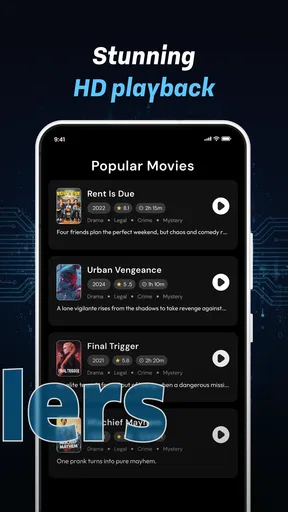
The available information is especially handy when a title’s name is familiar but the details are not. Cast information can help distinguish one production from another, while reviews and ratings offer a quick snapshot of how it has been received. Teasers are useful for checking the tone without relying only on a poster or a friend’s description. Release information, meanwhile, can help orient you when a title is new to you or when you are trying to place it in context.
I would not treat any single rating as a verdict. Ratings condense many opinions into one signal, and reviews can reflect tastes that differ from yours. A more useful habit is to use a score to decide whether to investigate further, then read a little about the story and cast before making up your mind. That small extra step is particularly helpful if you are choosing for a group, since one person’s favorite genre may not be everyone’s choice.
Pro Apps Laboratory publishes the app in the Libraries & Demo area, which fits its role as an information and browsing tool rather than a video player. It is free to install, is rated for Everyone, and has passed 100K+ installs. The current version is 1.7, and the listed minimum operating system is Android 7.0. Those basics make it easy to understand who can try it, while the presence of optional in-app purchases means “free” should not be read as a promise that every possible item or feature is cost-free.
Who will get the most from it
This is a natural fit for casual viewers who want a quick reference while deciding what to watch, people who enjoy checking cast details, and fans who like comparing reactions to a drama or series. It can also help when someone recommends a title but cannot remember the lead actor or explain why they enjoyed it. Instead of opening several unrelated searches, you can start with a guide built around entertainment information.
It is less suited to anyone whose main goal is to stream episodes, manage a detailed viewing calendar, or keep a carefully organized collection of watched and planned titles. The app’s stated purpose is informational. If you need playback, availability by subscription, or a persistent tracking system, a streaming platform or a dedicated watchlist app is likely to be a better match. Knowing that before installing saves the common disappointment of expecting a catalogue to behave like a player.
Worth Reading Before You Choose

Baby Panda World Brings Quick Play to Modern Phones, but Its Game Library Feels Busy

ESPN’s Live Game View Makes Following Close Games Easier

QuizzLand Review: A Good Fit for Short Trivia Breaks, Not Every Player

Basketball Stars: Multiplayer Is Fast, but Can It Recover When Matches Go Wrong?

WEBTOON Turns Phone Updates Into a Better Reading Routine

Link to Windows Runs on Shared Habits, Not Social Feeds
I would also recommend it to someone who watches across several services and wants to separate the question “What is this title?” from “Where can I play it?” That distinction makes browsing feel less circular: use the guide to identify a production and gauge its appeal, then move to the service that might carry it. Viewers who already know exactly what they want and only need a play button may find that extra step unnecessary.
A first setup that keeps expectations clear
After installing, I would begin with one title I already know rather than trying to explore everything at once. Search or browse for a familiar film or series and check whether the page gives you the kind of context you came for: cast, audience response, a teaser, or release information. This simple test helps you learn how the guide presents entertainment details before you rely on it to choose something unfamiliar.
If you are browsing with a particular person in mind, decide what matters before opening the app. For a family evening, the useful question may be whether the title looks appropriate and appealing to everyone; for a fan of a particular performer, cast details may be the main draw. The Everyone content rating describes the app itself, not the suitability of every film or series discussed inside it. I would therefore still check a title’s own content and age guidance through an appropriate source before choosing it for a child.
There is no need to make the first visit a long research session. Pick one title, inspect the information that matters, and leave once you have enough to make a decision. This keeps the app in its strongest role: a lightweight guide that helps you move from vague curiosity to a more informed choice.
A small practical tip is to remember the exact title, actor, or release clue that brought you to the app. Similar names and different productions can make an informal recommendation hard to pin down, so use cast details as a confirmation step rather than assuming the first matching result is the right one. If the information does not seem to fit what your friend described, pause and check the name before drawing a conclusion about the show.
Your first useful result: turn a recommendation into a decision
A realistic first success might happen on a weeknight when a friend mentions a drama, but you have only a few minutes before everyone wants to start watching something. Look up the title, use the cast information to confirm you have the right production, glance at the reviews or ratings for a sense of reception, and watch the teaser if you need to judge the tone. You can then decide whether to search for it on a service you already use or choose something else.
That workflow is more reliable than stopping at a rating. A title can be popular and still not match your mood; a teaser may reveal that its pacing or style is not what you wanted. Conversely, a modest score need not rule out a show if its cast or premise is exactly your kind of thing. I like using the guide’s different information types as separate clues instead of treating them as a single recommendation engine.
For a group, try a quick two-stage decision. First, use the guide to narrow the options to a couple of titles that fit the evening. Then let each person choose between those options rather than asking everyone to browse from scratch. That approach limits endless scrolling and uses the app’s lookup strengths without expecting it to know your group’s preferences automatically.
For a longer series, I would make the first check more deliberate than I would for a one-off film. Use a teaser to see whether the style appeals, then look at the cast and written reactions to get a broader feel before you commit to a substantial viewing project. For a short, spontaneous choice, that level of checking can be overkill. Matching the effort to the time you are about to invest is a useful way to keep an information guide from turning into another source of indecision.
Common confusion: guide information is not the same as availability
The most important distinction is between learning about a title and finding where it can be watched. Movie Drama & TV Series: Info is presented as an entertainment guide, so I would not assume that a teaser or a title page means full episodes are available in the app. If you decide to watch something, check your usual streaming or rental services separately. Their catalogues and access terms are the relevant place to confirm playback.
It is also easy to confuse release information with a promise that a title is currently accessible in your region. Release details can help identify when a production arrived, but they do not by themselves answer whether a service carries it now. When availability is the deciding factor, verify that directly before planning a movie night around a title.
Another point worth keeping in mind is that reviews and ratings are aids, not personalized advice. A broad audience response may not reflect your preferences, and a short teaser cannot show every aspect of a long series. I would use them to create a shortlist, then make the final call based on the kind of story or performance I actually enjoy.
The app is free, but it offers in-app purchases ranging from $0.39 to $99.99 per item. That range makes it sensible to pay attention to any purchase prompt and decide whether an optional item is useful to you before buying. You can begin by exploring its basic purpose without treating a purchase as a necessary first step; if something is presented for sale, take a moment to understand what it offers and whether it solves a problem you genuinely have.
Another reasonable question is whether a guide like this can replace a streaming app’s own browse screen. I would not use it that way. A streaming service is better when the priority is to see what is available through that service and start playback immediately. This app is more useful earlier, when the title is still unfamiliar or you want cast and audience context before searching the service catalogue. Keeping those jobs separate avoids expecting either kind of app to do the other’s work.
Making the guide more useful on your next visit
Once you have tried a familiar title, use the app for a more specific question. If a recommendation names an actor but not the production, cast details can help you identify the right work. If you have heard mixed opinions, compare the rating with written reviews instead of letting one number settle the issue. If you are unsure whether a show suits your mood, a teaser can provide a quick impression before you spend time looking for it elsewhere.
A useful trade-off is depth versus speed. A quick glance at cast and ratings is convenient when you just need to choose between two options; a more considered look at reviews and a teaser is better when you are about to start a long series. I would reserve that deeper check for titles that ask for a bigger time commitment. For a casual film choice, too much pre-screening can take longer than simply picking something and giving it a chance.
Compared with general web searches, a dedicated entertainment guide has a narrower purpose: it keeps attention on film and television details rather than mixing them with unrelated results. Compared with streaming apps, it serves a different stage of the decision. Streaming apps are the better place to browse what is playable on a given service and start watching; this guide is more useful when you want background information or a second opinion before you get there. Neither replaces the other, and using them together is the practical approach.
It also occupies a different role from a personal watchlist. A tracker is useful when you want to remember what you have finished, what you plan to start, or where you left off. I would choose a tracker for that ongoing organization and use this guide when a title needs checking before it earns a place on the list. If you mainly want one dependable record of your viewing habits, a second information app may not improve your routine enough to justify adding it.
For readers using an older Android device, the minimum operating system is Android 7.0, so checking the device version before downloading is a straightforward way to avoid setup frustration. The app is also listed for Everyone, though that does not change the age guidance for the entertainment titles you look up. Those small checks are worth doing before you start searching, especially if you are setting it up for someone else.
My recommendation after trying its role
I see Movie Drama & TV Series: Info as a focused companion for the “What is this, and should I try it?” moment. Its mix of cast, ratings, reviews, teasers, and release details gives you several ways to assess a title without making a single score do all the work. For a first-time user, the easiest path is to look up something familiar, learn how the information is presented, and then use the same routine to check a recommendation.
I would recommend it to curious viewers who like having entertainment context close at hand and want a simple starting point for choosing a drama or series. I would skip it if I wanted direct playback, guaranteed regional availability, or a comprehensive personal viewing tracker; those needs call for a different kind of app. Used for what it is—a free guide from Pro Apps Laboratory, with optional purchases to consider—it can make the search before a watch a little more informed and a lot less guesswork-driven.
My practical takeaway: use the guide to confirm the title, sample its tone, and weigh audience reactions, then check your streaming service before settling in. That small sequence is the clearest way to get value from it without mistaking entertainment information for a place to watch.
Pros
- Simple way to browse information about movies
- dramas
- and TV series.
- Useful for discovering titles across different genres.
- Cast and production details can help identify a show before watching.
- Convenient reference for comparing entertainment options.
- Focused on title information rather than streaming content.
Cons
- Does not let you watch movies or episodes in the app.
- Information may be incomplete or outdated for some titles.
- Availability and viewing links can vary by region.
- The app’s usefulness depends on its catalog matching your interests.
- May require internet access to load title details.
FAQs for Movie Drama & TV Series: Info
What is Movie Drama & TV Series: Info?
Movie Drama & TV Series: Info is an entertainment reference app for people who want to explore information about films and television series. Depending on the version available in your region, its listings may include details such as descriptions, genres, cast, release information, or related titles. Check the app’s current store listing to confirm which features and types of content are available before installing.
Can I watch movies or TV episodes in the app?
The app’s title suggests that it focuses on movie and TV-series information, not necessarily on streaming or downloading video. Do not assume that it provides access to full episodes, films, or offline viewing unless the app description explicitly confirms those features. For watching a title, check the official streaming services or other licensed providers available in your country.
Is Movie Drama & TV Series: Info free to download and use?
The price and payment options can vary by platform, location, and app version. Review the Google Play or Apple App Store listing for the current download price, in-app purchases, subscriptions, and any advertising disclosures. If you see a trial or recurring subscription offer, read its terms carefully and confirm how to cancel it before agreeing to pay.
Does the app require an account, and what personal information might it collect?
Account requirements and data practices can change between releases, so check the app’s store privacy details and its privacy policy before providing personal information. A reference app may offer browsing without registration, but that should not be assumed. Review any permissions requested during setup, and consider whether they make sense for the features you intend to use.
Is Movie Drama & TV Series: Info available for Android and iPhone?
Availability depends on the developer, your device, and your country. Search the official Google Play Store on Android or Apple App Store on iPhone and verify that the publisher and app name match before downloading. Check the listed operating-system requirements, recent update date, and user reviews as well; these details can help you judge compatibility and whether the app is currently maintained.


